
Key takeaway: For IPTV on Samsung TV or LG, note that Tizen and webOS TVs cannot run Android apps, so you choose an IPTV player from the TV’s own store. Some log in inside the app; others show a MAC address you use on their website.
Samsung TVs run Tizen and LG TVs run webOS. Neither can install Android apps, so popular Fire TV players such as TiviMate are not available. Instead, you pick an IPTV player from the TV’s own app store. The good news: no extra box is needed, and setup takes about ten minutes.
This guide explains IPTV on Samsung TV and LG step by step: which players to look for, how to install them, the two ways they add your playlist, activation, picture settings and when a streaming stick is the better choice.
Good to know: every app here is a player only. None include channels, so you need a playlist from an IPTV service.
In this guide
What you need
- A Samsung (Tizen) or LG (webOS) smart TV connected to the internet
- A Samsung or LG account to download apps
- Your IPTV login (Xtream Codes details or an M3U link)
- A phone or computer, for apps that use a website to add playlists
IPTV on Samsung TV and LG: players to look for
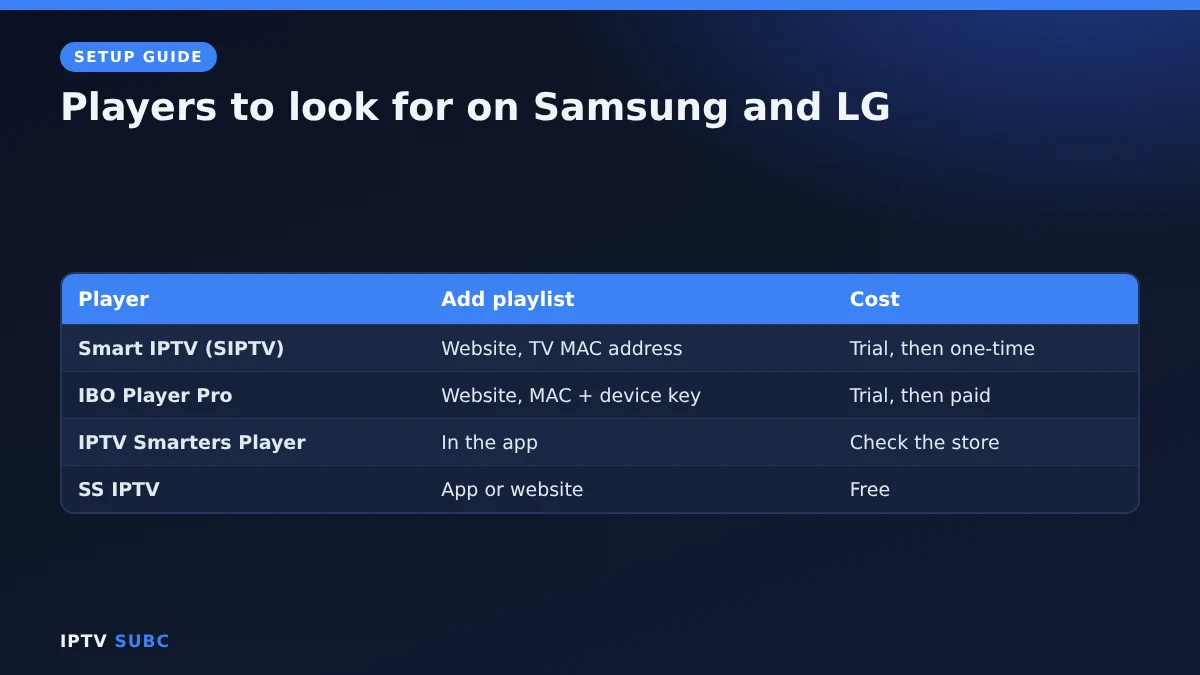
App stores on TVs differ by country and model, so an app one person sees may be missing for you. These players are widely available:
| Player | How you add a playlist | Cost |
|---|---|---|
| Smart IPTV (SIPTV) | On its website, with the TV’s MAC address | Trial, then one-time activation per TV |
| IBO Player Pro | On its website, with MAC address and device key | Trial, then paid plans |
| IPTV Smarters Player | In the app, with Xtream Codes or M3U | Check the store listing |
| SS IPTV | In the app or on its website | Free |
Prices and trial lengths change, so always check the app’s store page or official website. Smart IPTV, for example, lists Samsung Tizen 6.5 (2022 models and newer) and LG webOS 3.0 and newer on its official site.
Install IPTV on Samsung TV
- Press Home on the remote and open Apps.
- Select the Search icon and type the player’s name.
- Open the app page and select Install. Sign in to your Samsung account if asked.
Install on LG
- Press Home and open the Apps store (called LG Content Store on older TVs).
- Use Search to find the player.
- Select Install and sign in to your LG account if asked.
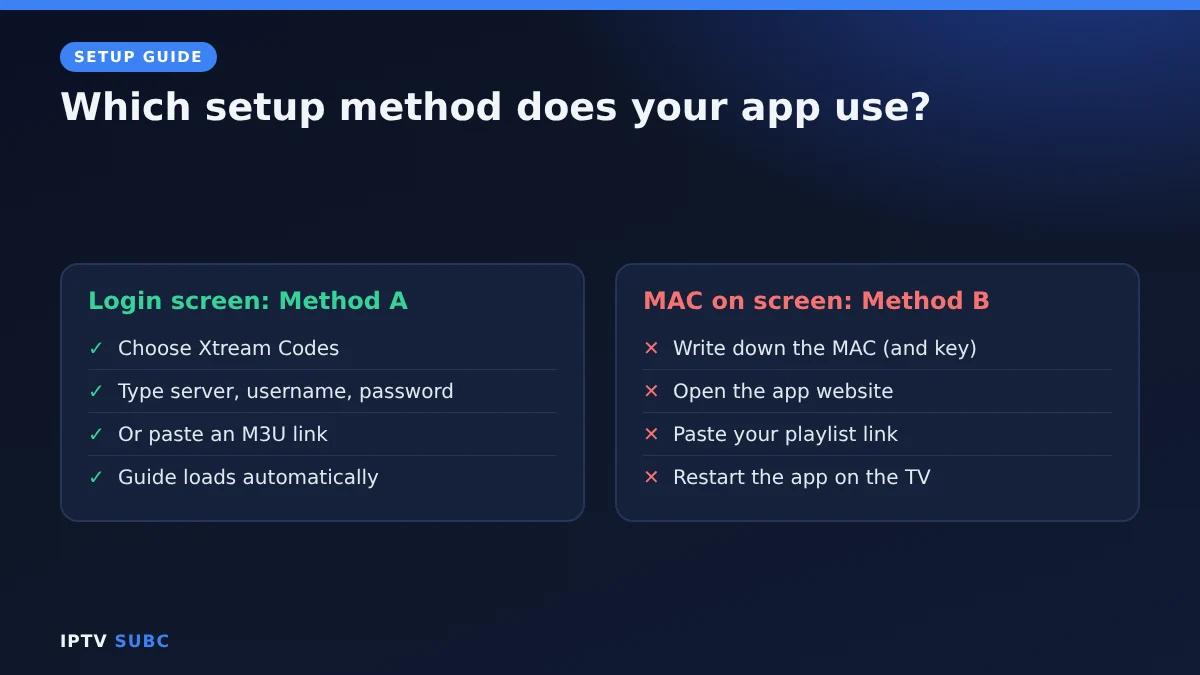
Two ways to add your playlist
Open the app. What you see next tells you which method it uses.
- A login screen (Method A): choose Xtream Codes and type the server address, username and password. This is the easiest option, because channels, films and the guide load automatically. Otherwise, choose M3U and paste your playlist link.
- A MAC address on screen (Method B): write it down, along with any device key. Then, on your phone or computer, open the player’s official website, go to its playlist upload page, enter the MAC address and paste your playlist link. Finally, restart the app on the TV. Our Smart IPTV guide shows a full example.
Activate before the trial ends
Many TV players start as a free trial and then need an activation on their website, linked to your TV’s MAC address. Pay only on the app’s official website, and activate before the trial ends so you keep your playlist. Remember, this payment is for the player, not for channels.
Better picture and fewer pauses
- Use a cable. Most smart TVs have an Ethernet port, and a wired connection is the best cure for buffering.
- Keep the TV updated. On Samsung, look under Settings, Support, Software Update; on LG, under Settings, General, About this TV. Menu names vary by year.
- Turn off energy saving features that dim or slow the TV if playback stutters.
- Restart the TV fully now and then by unplugging it for a minute, which clears its memory.
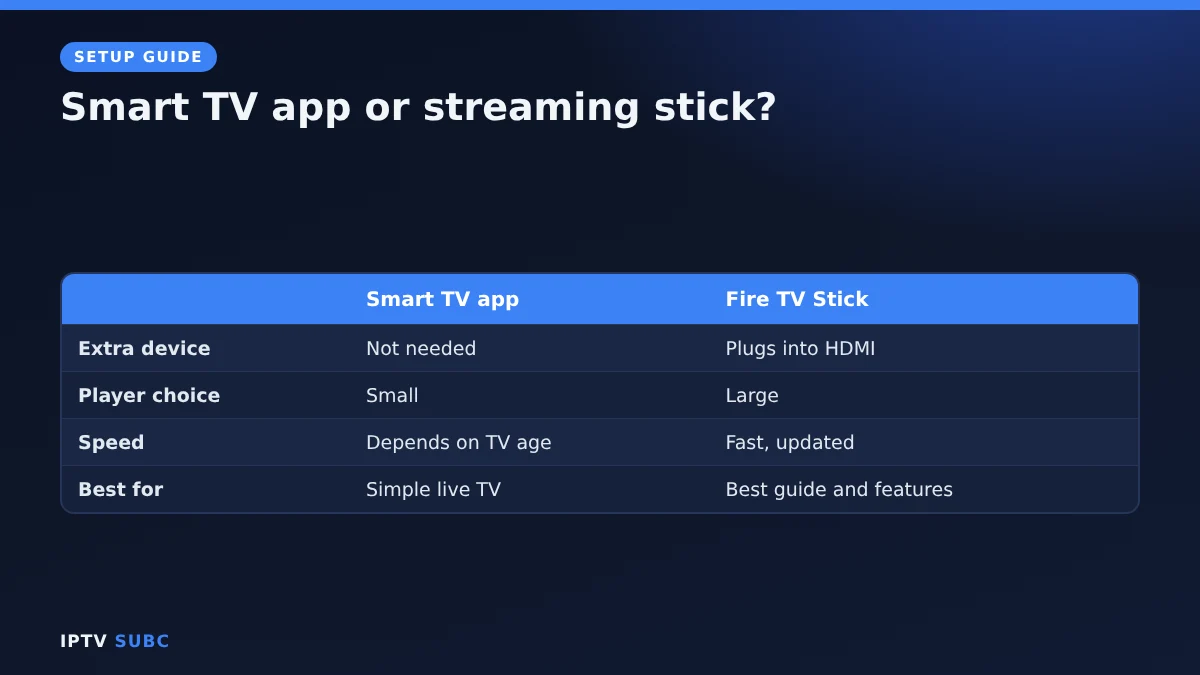
Smart TV app or streaming stick?
| Smart TV app | Fire TV Stick | |
|---|---|---|
| Extra device | Not needed | Plugs into HDMI |
| Choice of players | Small | Large (TiviMate, Smarters, OTT Navigator) |
| Speed and updates | Depends on the TV’s age | Fast, regular updates |
| Best for | Newer TVs, simple live TV | Older TVs, best guide and features |
If you go with a stick, choose a Fire OS model such as the Fire TV Stick 4K Max, then follow the IPTV on Firestick quick start.
Troubleshooting
| Problem | Fix |
|---|---|
| App not in my TV’s store | Store content differs by country and model; try another player or a stick |
| “Invalid MAC” on the website | Copy the MAC exactly from the app; watch for 0/O and 1/I |
| Playlist does not show | Close the app fully, restart the TV and open it again |
| Xtream login fails | Include http:// and the port in the server address |
| Channels buffer | Use Ethernet, then follow our IPTV buffering fixes |
The original lesson is IPTV on Smart TV (Samsung and LG) on Legion Webs.
For more smart TV options, including Android-based TVs, see 8K IPTV Group’s guide to setting up IPTV on a smart TV.
FAQ
Can I install TiviMate on a Samsung or LG TV?
No. TiviMate is an Android app, and Samsung and LG TVs do not run Android.
What is the best app for IPTV on Samsung TV?
If your provider gives Xtream Codes details, an app with in-app login is easiest. With an M3U link, Smart IPTV and IBO Player are popular.
Is there a free IPTV player for LG TV?
Yes, SS IPTV is free. Many others offer a free trial and then a small activation fee.
Where do I find my TV’s MAC address?
Use the one the IPTV app shows on its own screen. Some apps create their own ID, which may differ from the network settings.
Does my TV need to be new?
Newer TVs have more players and run them faster. Check each app’s supported models on its official site.
Next steps
Running Android or Google TV instead? Follow IPTV on Android TV. Compare every option in the best devices for IPTV.
As an Amazon Associate, we earn from qualifying purchases made through device links on this page.